Your own apps
Your own apps, built in a conversation
Describe the app you need to Claude Code or another coding agent. With the Wyndlass app SDK’s skill, it builds the app with you, previews it on your computer and imports it through the MCP server. A person approves each version before any screen plays it.
You: Build an app for our lobby screens that shows the ticket number being served and the next three.
Agent: I’ll use the wyndlass-app skill. First: which way do the screens face, where do the numbers come from, and what should the app be called?
You: Landscape. They’re in our Queue data table. Call it Queue board.
Runs: npx @wyndlass/app-sdk create queue-board --template react
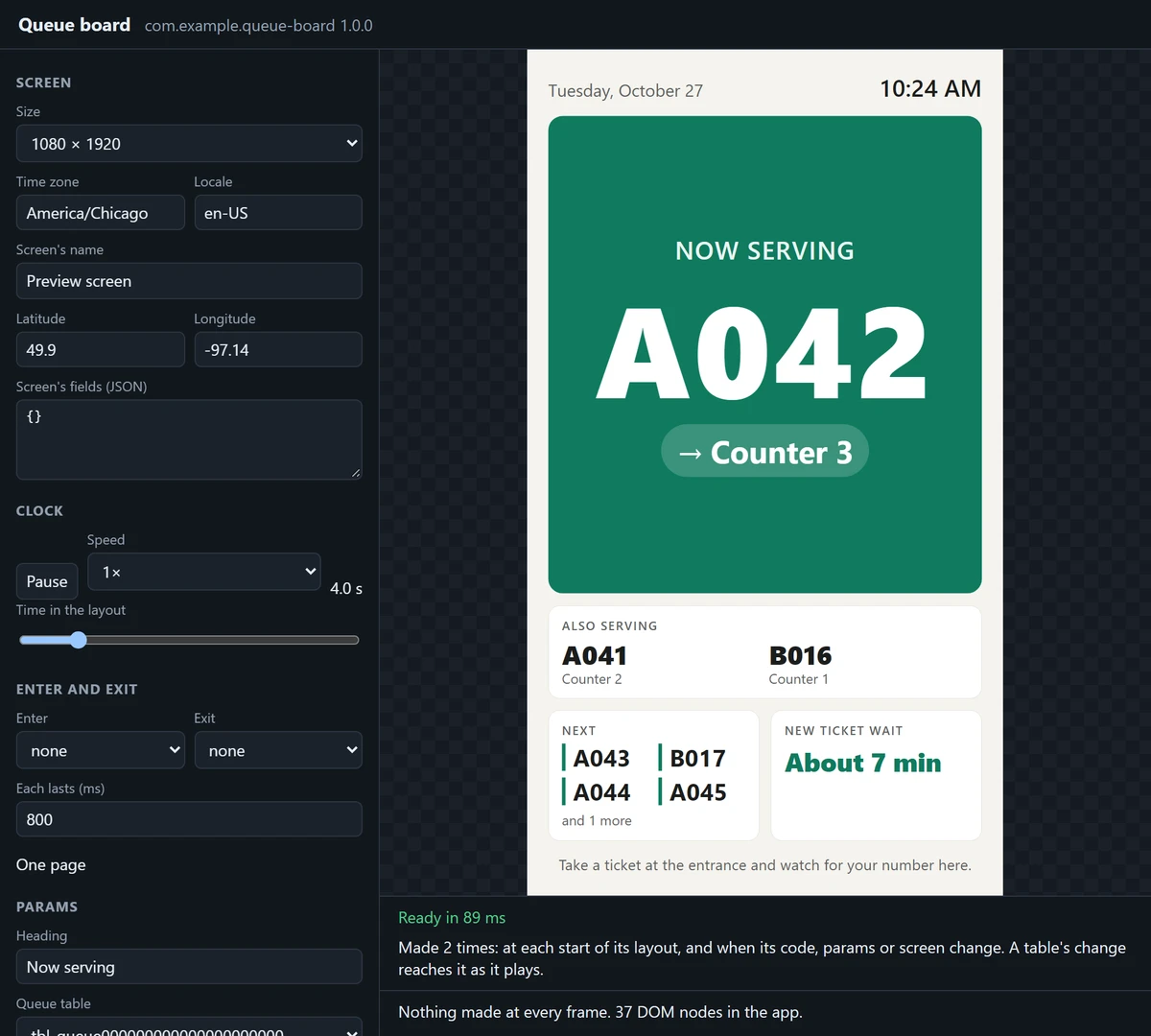
Agent: The preview is running on this computer. Have a look at 1920 × 1080, then at 1080 × 1920.
You: Make the number bigger.
Runs: npm run pack
dist/com.example.queue-board-1.0.0.zip: 74619 bytes, ready to import.
Agent: It’s packed, and passes the checks Wyndlass makes on import. Where should I import it?
With a coding agent
Ask for the app you want
The app SDK comes with a skill: the steps a coding agent follows to build an app with you. Add it to a project with one command, then ask in your own words, such as “a board that shows the queue number being served”.
- The agent first asks what the app shows and to whom, which way your screens face, the data it needs, and its name.
- It makes the app from a template and previews it with you on your computer, in both orientations and as the CMS will run it.
- It checks and packs the app, then imports, places and schedules it through the Wyndlass MCP server, asking you before each.
- Claude Code finds the skill in the project, and every new project’s AGENTS.md gives any coding agent the same rules and steps.
The agent signs in to Wyndlass as you, with your permissions, and never approves a version: a person does, in the CMS.
Connect Claude Code to Wyndlass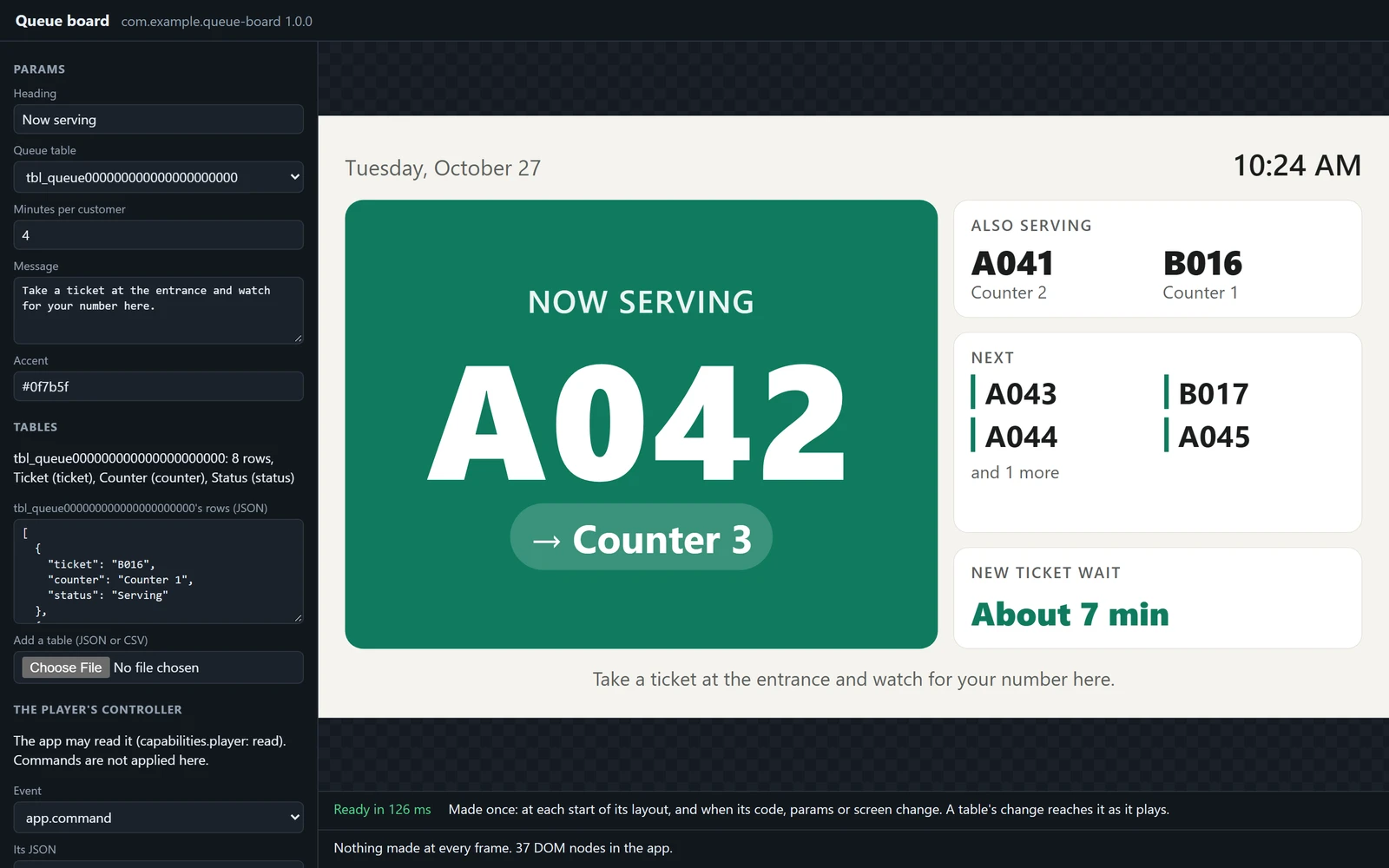
The app SDK
Web code, on the runtime Wyndlass’s own apps use
An app is a web component, written in React or in TypeScript with no framework, with the app SDK: free on npm, with two templates, the runtime Wyndlass’s own apps are built on, and a command that previews, checks and packs your app.
- The preview runs your app on your computer as a screen runs it: any screen size, the layout’s clock from 0.25× to 4×, its animations, sample data, and data tables from CSV or JSON.
- It says what a screen would report, such as an app that was late to say it was ready, and runs the app in the CMS’s sandboxed frame before you import it.
- The check makes the checks Wyndlass makes on import, and gives the same answer.
- Nothing reaches Wyndlass until you import it.
Import, place and schedule
From your computer to your screens, with your yes
Your agent imports the app through the MCP server as you, places it in a layout and schedules it, asking before each. Or import the package yourself, in the CMS’s library.
- The package goes straight from your computer to an upload address that’s open for an hour, never through the conversation, and the upload command keeps no token.
- Wyndlass scans and checks every version, and the agent tells you whether it was approved, held for review or refused, and why.
- In the designer, your app is listed under Your apps, beside Wyndlass’s, and takes its settings in the Inspector like any other app.
- Publishing a campaign is previewed first, and your approval policies still apply.
AI tools can import apps only once an Owner or Admin turns on Imported apps for your organization.
You: Store 12. Then put it on a new layout for the lobby screens there, from Monday.
Wyndlass tool: wyndlass · app.prepareImport
An upload address, open for an hour
Runs: npx wyndlass-app upload "<address>" dist/com.example.queue-board-1.0.0.zip
Wyndlass tool: wyndlass · app.import
Held for review: the app’s first version
Wyndlass tool: wyndlass · layout.save
Lobby queue, with Queue board showing the Queue table
Wyndlass tool: wyndlass · campaign.save
A draft, from Monday, at Store 12
Agent: Publishing the campaign puts Lobby queue on the 2 lobby screens at Store 12. Shall I publish it? They’ll show the app once a person approves it in the CMS: here’s the link.
What an app can use
Rich apps, with your data and the screen’s
Your app runs on the runtime Wyndlass’s own apps use. What it asks for, from data sources to control of the player, is shown to the person who approves it.
Settings in the designer
Text, numbers, choices, colors, fonts, media and data tables, set for each layout in the designer’s Inspector.
Data tables, live
Show a table’s rows, such as prices or queue numbers. A save reaches a playing app within about a second.
Weather, news and calendars
Through Wyndlass’s data service, so screens hold no provider keys and keep the last answer offline.
The layout’s clock
Your app draws on the layout’s clock and takes its enter and exit animations: fade, scale, slide up or slide left.
The player
It can read what plays and, if it asks, control playback, sound and the display.
Your own systems
Connect to your own HTTPS services. The hosts it lists are shown to the person who approves it.
Under your control
A person approves every version, and screens keep it in its box
An app runs code on your screens, so no new app plays until someone who may approve media where it is has read what it asks for and said yes.
New apps and new asks wait
An app’s first version is held for review, and so is a later one that asks for more, such as control of the player, sound or a new host. Only a person approves: never the assistant, an agent or an AI tool.
Versions never change
Screens play the newest version that’s checked and approved, and keep the one before while a newer one waits. Archiving the app takes it off every screen at once.
Kept to its box
On screens, what an app adds outside its box is removed, and alerts, prompts and new windows do nothing. One that fails three times in a minute is stopped, and the rest of the layout plays on.
Sandboxed in the CMS
In the designer, your app runs in a frame on a site of its own, with no storage, no cookies and no way into the CMS’s page.
Your own apps: common questions
Do we need developers to build an app?
You need a computer with Node.js 20 or later. A coding agent such as Claude Code, with the app SDK’s skill, writes the app with you: it asks what the app should show, previews it with you and makes the changes you ask for. Developers can also write apps themselves, in React or TypeScript.
Which coding agents work with it?
Claude Code finds the app SDK’s skill once it is installed in the project, and connects to Wyndlass through the MCP server. Every new project also has an AGENTS.md file that gives any coding agent the same rules and steps.
Can the agent put an app on our screens by itself?
No. It asks before it imports, places or schedules anything, it acts with your permissions, and it can never approve a version. A person who may approve media approves each new app in the CMS before any screen plays it.
Can an app use our own data?
Yes: a data table in Wyndlass, chosen in the app’s settings, or your own HTTPS service, which the app lists for the person who approves it. Keep secrets out of the app: anyone who can read the layout or the app can read its settings and code.
Which screens can play our apps?
All of them. Every Wyndlass player runs your apps in their place in the layout, like Wyndlass’s own, and an app keeps showing the data the screen kept when it goes offline.
How do we turn it on, and what does the app SDK cost?
An Owner or Admin turns on Imported apps in Settings, for the whole organization or one place; it is off until then. The app SDK is free on npm, under the MIT licence.
See Wyndlass on your screens
Access is by invitation during launch. Tell us about your network and we will reply by email.