The true convergence of AI and digital signage
AI forward digital signage
windlass noun a winch that lets a small crew raise a heavy anchor.
Wyndlass lets AI agents do anything you can in the CMS, held fast by the permissions, approvals and rollback you set.
Access is by invitation during launch.
Why Wyndlass
AI does the heavy lifting. You stay at the helm.
Many digital signage platforms have bolted AI features onto an existing CMS, mostly to help you write and design. Wyndlass was built from the ground up with AI in mind, so agents can run the platform itself, inside rules you control.
- How it was built
- AI bolted onto a CMSAI features added on top of a CMS that was designed without them.
- WyndlassDesigned for AI from day one: agents and people use the same actions and the same controls.
- What the AI can do
- AI bolted onto a CMSDrafts copy and generates images inside an editor.
- WyndlassTakes the same actions you can in the CMS: content, playlists, schedules, devices and data.
- Whose access it uses
- AI bolted onto a CMSUsually acts with the access of whoever opened it.
- WyndlassHas its own fine-grained permissions, set separately from any person’s.
- High-consequence changes
- AI bolted onto a CMSGo live as soon as someone accepts a suggestion.
- WyndlassWait for an authorized person to approve them.
- When something goes wrong
- AI bolted onto a CMSFixed by hand, screen by screen.
- WyndlassRolled back in one step, with a record of exactly what changed.
- Visibility
- AI bolted onto a CMSAI edits blend into the general activity log.
- WyndlassEvery action, by every agent and every person, is audited.
- Running the network
- AI bolted onto a CMSCalendar schedules you keep up to date yourself.
- WyndlassAgents that run on a schedule, react to events and fix the issues they find.
- Your own AI tools
- AI bolted onto a CMSUsually only a chat window inside the app.
- WyndlassThe built-in assistant, plus the platform’s actions over MCP, so assistants you already use can work with it too.
How it works
One request, start to finish
Ask for a change in plain language. Wyndlass plans it, checks it against your rules, gets the right approval and keeps a record you can roll back.
You
Switch every downtown menu board to the holiday menu from Friday at 6 a.m.
Wyndlass agent
I found 14 menu boards in 5 downtown locations. On Friday at 6:00 a.m. local time I’ll replace the Fall menu playlist with Holiday menu. Price changes need a regional manager’s approval, so I’ve sent a request.
- 14 screens
- 5 locations
- Approval requested
Approval
Dana R. approved the change. Scheduled for Friday, 6:00 a.m. Rollback available.
Ask in plain language
In the Wyndlass app, or from your own assistant through MCP.
The agent plans the change
It finds the screens, playlists and schedules involved, and shows exactly what will change.
Permissions are checked
The agent can only see and do what its role allows.
The right person approves
High-consequence changes wait for an authorized approver. Routine ones can go straight through, if you allow it.
Applied, audited, reversible
Every action is recorded, and any change can be rolled back.
MCP server
Works with your AI assistant
Wyndlass works with Claude, ChatGPT, Cursor and VS Code through MCP (Model Context Protocol), so you can manage screens, content, campaigns and data from the AI assistant you already use.
Your assistant signs in as you and gets your permissions, never more. Approvals still apply, and every action is in the audit log as yours.
Works with
- Claude
- ChatGPT
- Cursor
- VS Code
And other AI tools that can add a remote MCP server and sign in with OAuth.
Server address
https://mcp.wyndlass.ai/mcp
Always-on operations
A network that looks after itself
Agents watch your network around the clock and act inside the rules you set.
- Alerts for anomalies, like a screen going dark or content failing to play, with optional agent remediation.
- Scheduled tasks that run agent jobs on a cadence, from nightly health checks to weekly content refreshes.
- Triggered tasks that start when something changes: media uploaded, a device registered, a data table edited.
Remediation follows the same permissions and approvals as any other change.
Retail media
Screens that earn their keep
Put advertising where and when it performs best, without hand-building every schedule.
- AI-assisted ad placement that weighs signals like weather, season, local events, device properties and audience metrics.
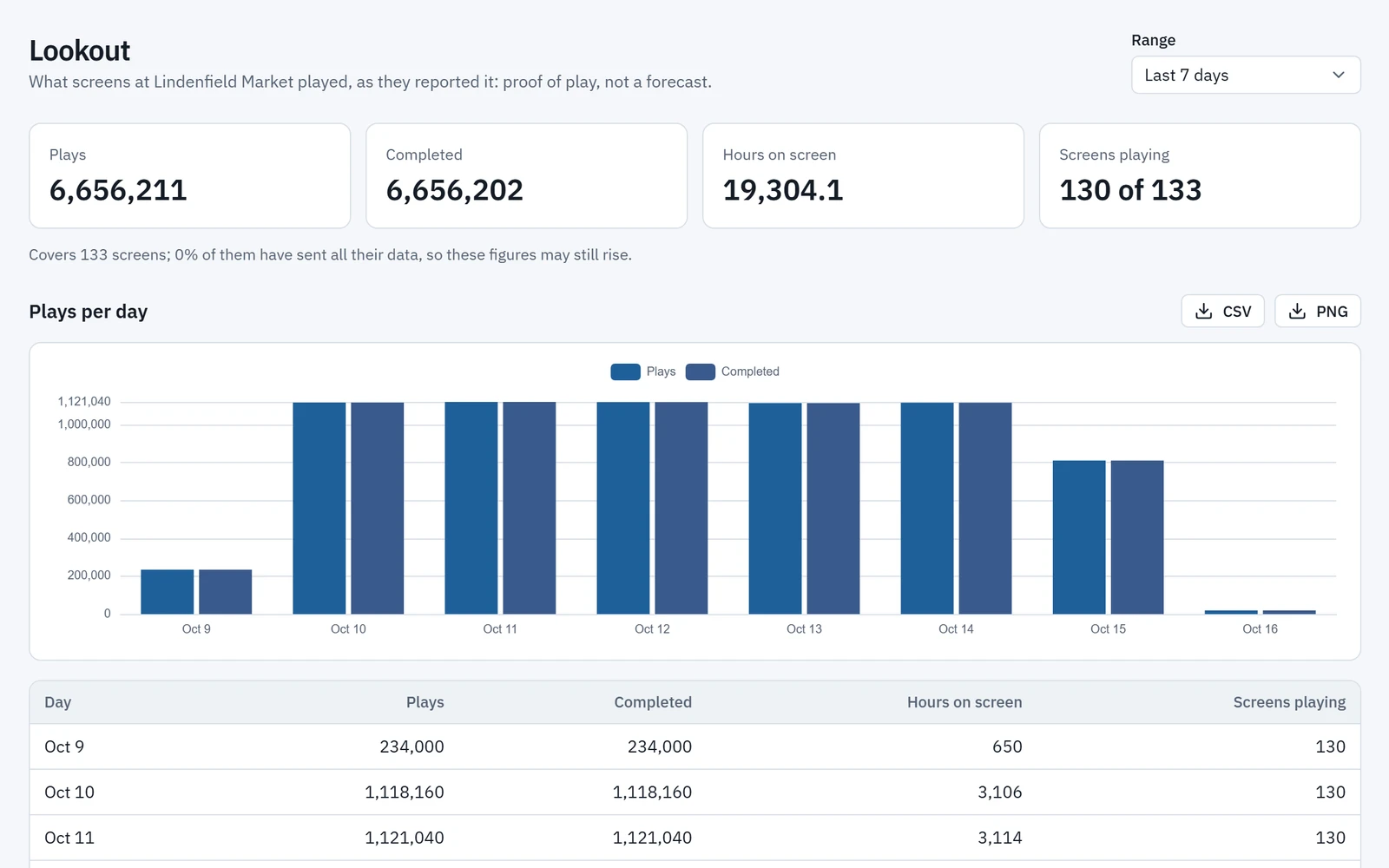
- Lookout, Wyndlass’s network analytics, shows playback across every screen, and audience performance wherever you measure it.
- Agents use Lookout data to optimize playback and position ads by what is working.
Placement rules and approvals keep every campaign on brand for you and your advertisers.
Layouts and pictures
From a sentence to a first draft
Say what a screen is for and what it should show. AI drafts the layout in the theme you pick, and you finish it by hand on the same canvas.
- The new-layout wizard asks what a layout is for, from 12 uses such as retail, restaurants and healthcare, then a theme and an optional prompt, and offers three layouts to choose from.
- Ask the designer’s assistant for an edit, a background picture or the data table a layout needs, such as “fade in the title, then the rest”.
- Make a picture from a prompt, in the shape you need, straight onto a layout or into the library. The cost in AI credits is shown first.
- The assistant follows your organization’s skills, such as your brand rules.
Each draft is a suggestion you apply or discard, and pictures made by AI can be held for approval before they play.
Scheduling
Great content, without the busywork
Let conditions decide when and where content plays, and let agents keep recurring content up to date.
- Condition-based scheduling: combine any number of conditions instead of juggling calendar slots.
- Agents that build recurring content, like event calendars and employee birthdays, and schedule it for the right dates.
- Data tables that sync from third-party data providers.
Brand-sensitive content can require approval before it goes live.
- WeatherisRainfrom a weather feed
- StoreisOpen
- Screen zoneisEntrance
- Umbrellas in stockis more than20from a data table
Instead of Mon to Fri, 9:00 to 17:00 on a calendar
A closer look
Worth seeing up close
More powerful features from Wyndlass, from apps built by describing them to forecasts beside proof of play, each captured from the product as it works today.
Your own apps
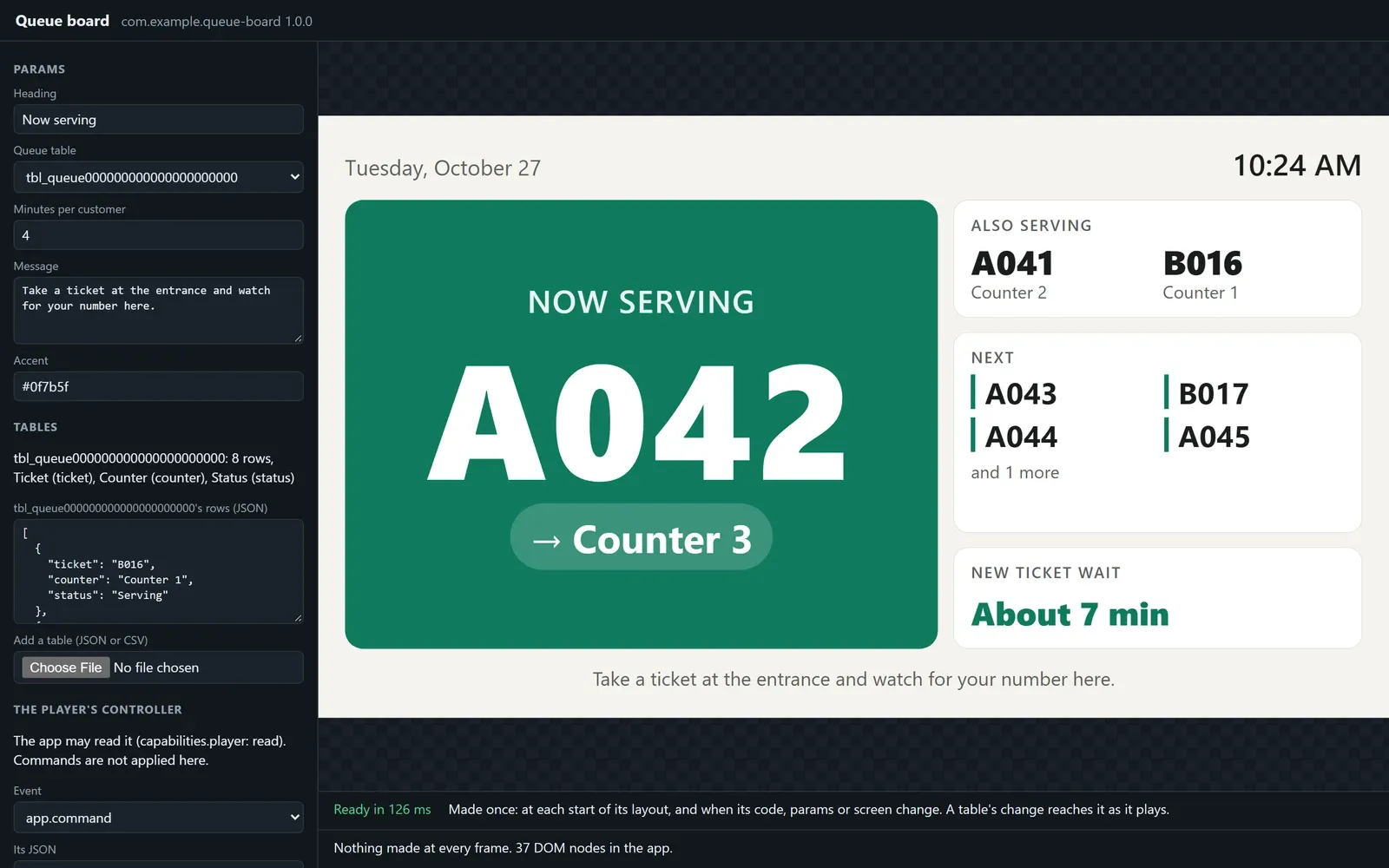
Apps built by describing them
Describe the app you need to Claude Code or another coding agent. It builds the app with the Wyndlass app SDK and imports it, and a person approves each version.
Content library
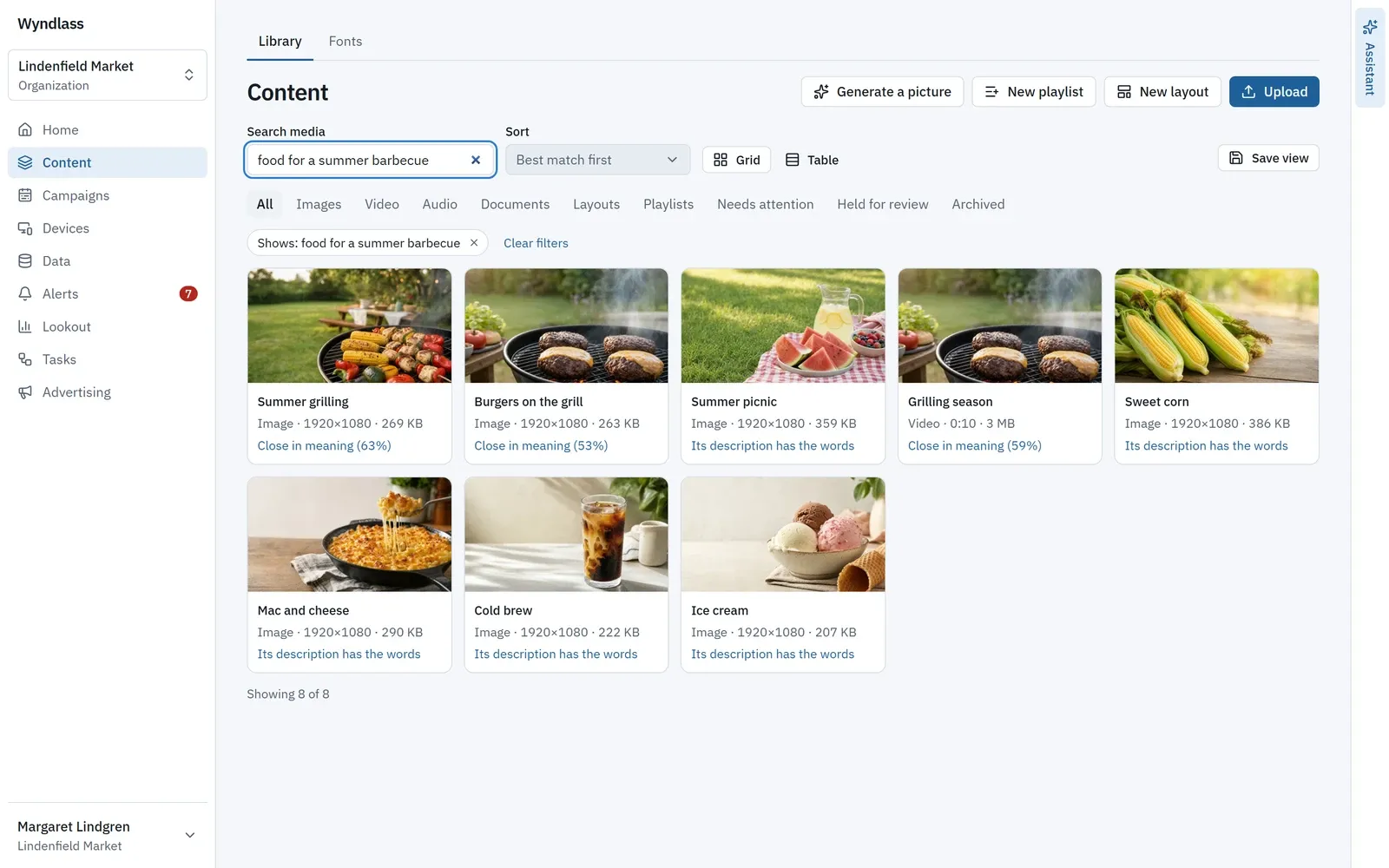
Find a picture by describing it
Type what a picture shows, such as “food for a summer barbecue”. The library finds it, best match first, and says why each one matched.
AI assistant and agents
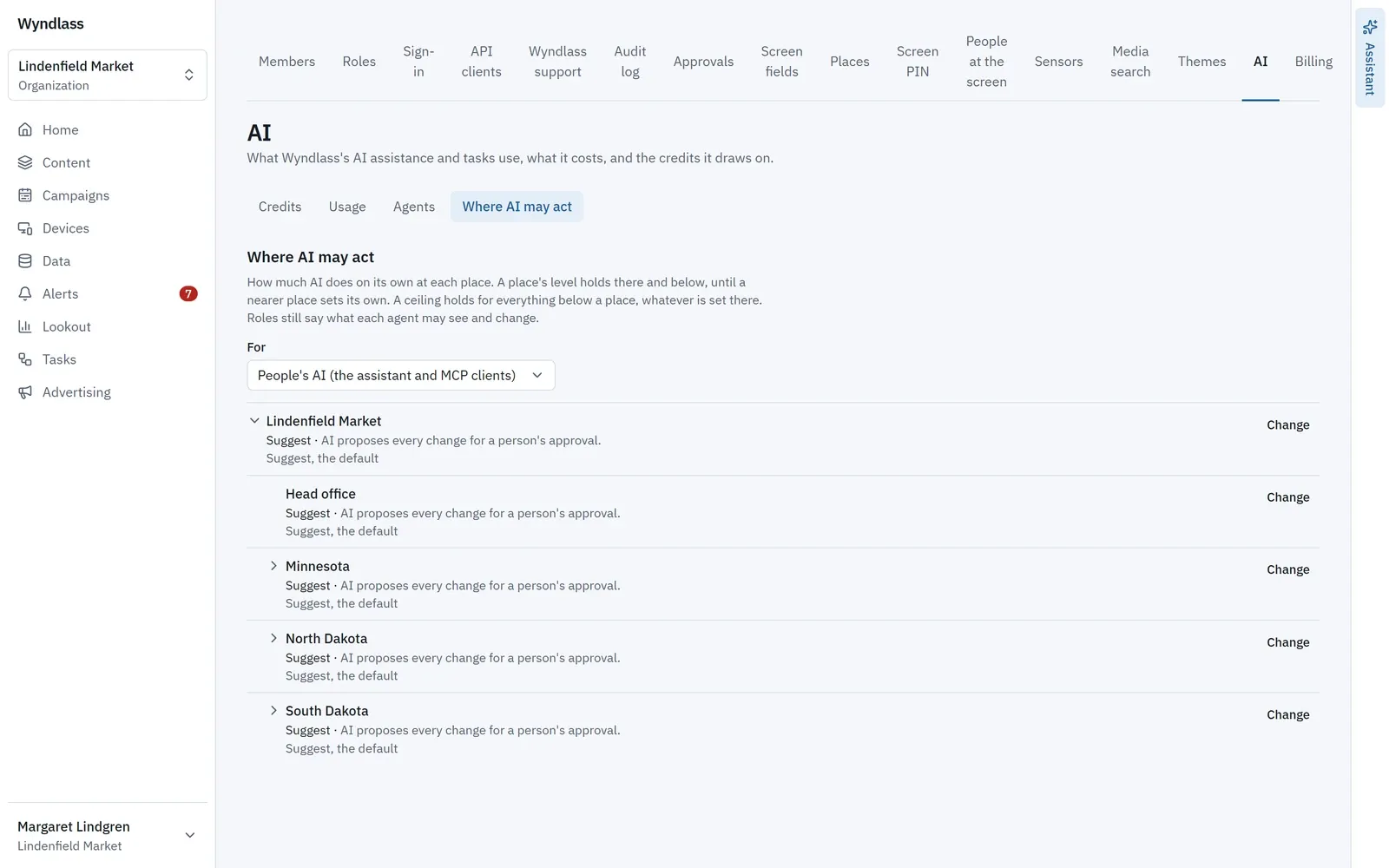
Decide how far AI goes, place by place
Set each place to Observe, Suggest, Co-pilot or Autopilot, with a ceiling for everything below it. Suggest, the default, holds every change AI starts for a person’s approval.
Screens and players
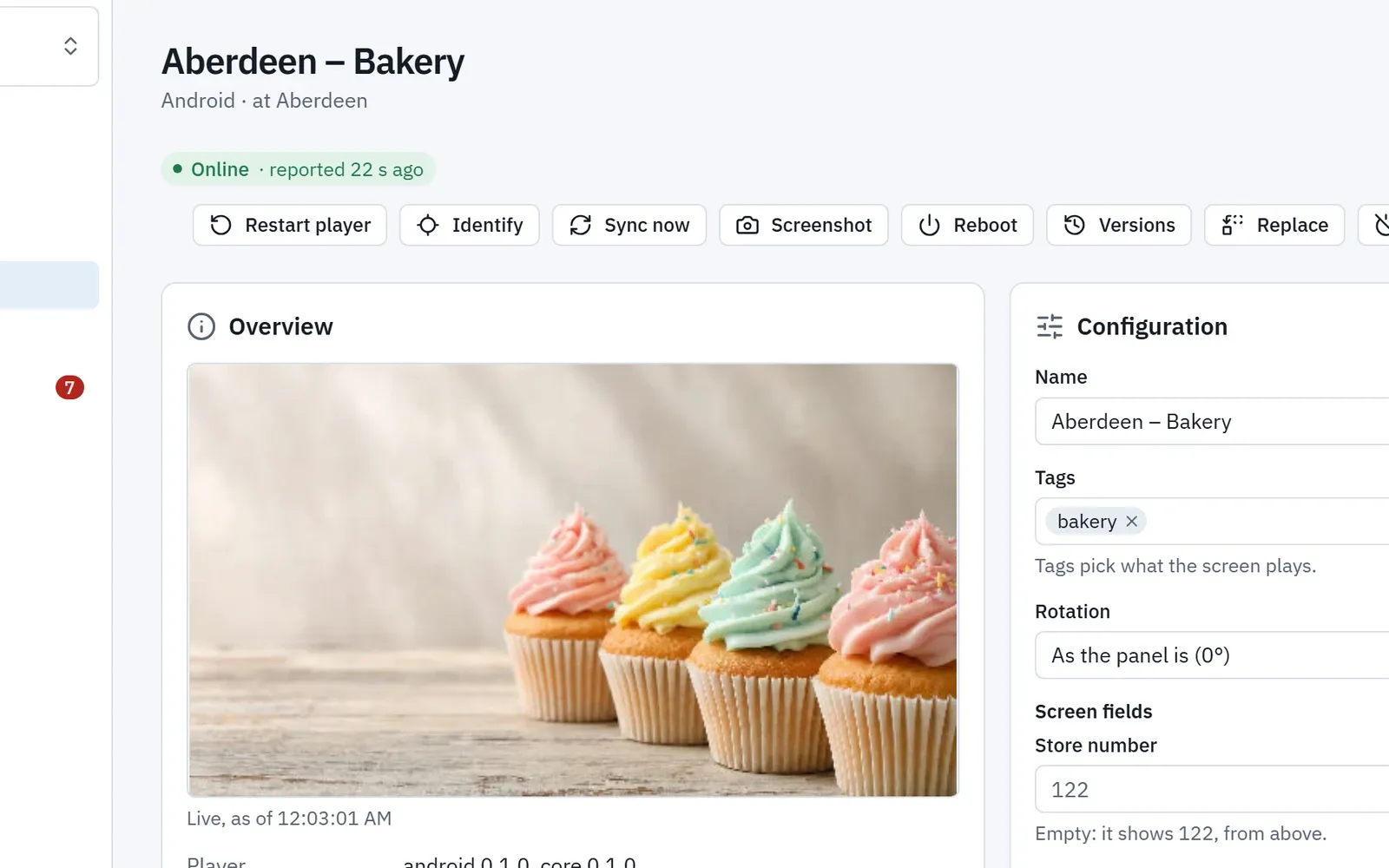
See what any screen is showing
A screen’s page shows a picture of what it plays, refreshed every 30 seconds while you watch, with restart, screenshot and reboot beside it.
Campaigns
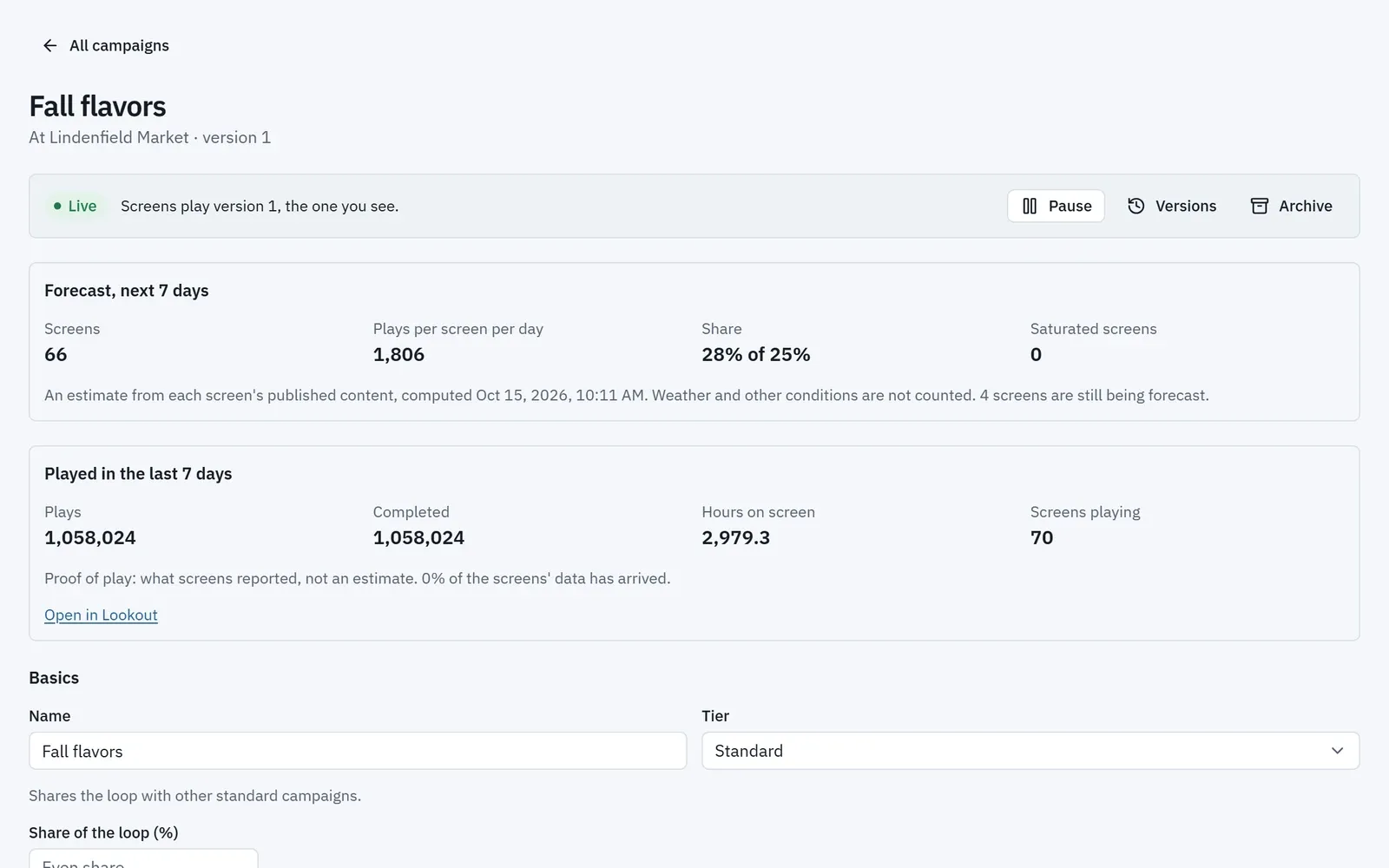
Forecasts beside proof of play
A campaign’s page forecasts its screens, plays per screen per day and share for the next 7 days, beside what screens reported playing last week.
Layout designer
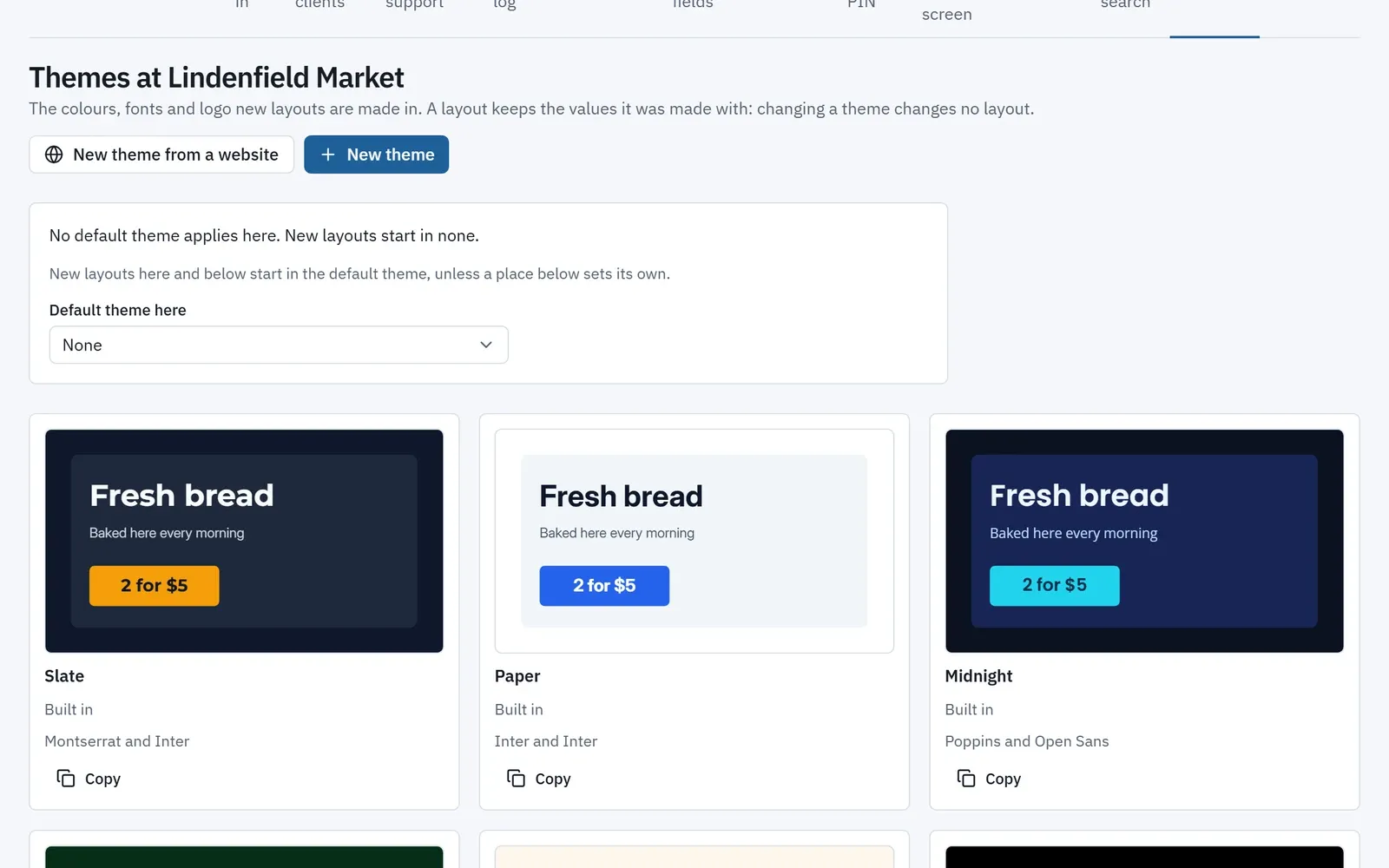
A theme from your website
Give Wyndlass your website’s address, and it reads your colours, fonts and logo into a theme for you to review before saving.
Built for enterprise
Ready for the way large organizations work
From a single brand to many customers, Wyndlass fits your structure and your security requirements. Available features vary by plan.
Multi-level organizations
Model regions, brands or customers as organizations, each with its own content and people.
Fine-grained permissions
Decide exactly what each person and each agent can see and do.
Enterprise sign-in
SAML single sign-on with the identity provider you already use.
Audit and monitoring
A complete record of every action, by people and by agents.
Questions buyers ask first
How is Wyndlass different from other digital signage CMSs?
Many signage platforms have bolted AI onto an existing CMS as a helper for writing and design. Wyndlass was built from the ground up with AI in mind, so AI agents can take the same actions you can in the CMS, each with its own permissions, approvals for high-consequence changes, a full audit trail and rollback.
Can the AI change our screens without anyone approving it?
Only within the limits you set. Every agent has its own permissions, and changes you mark as high-consequence wait for an authorized person to approve them.
What happens if an agent makes a mistake?
Every change is recorded, so you can see exactly what happened, who or what did it, and roll it back.
Do we have to let AI make changes?
No. People can do everything in the CMS themselves, and you can set an agent to propose changes only, so nothing happens until a person approves it. Give agents more room as you come to trust them.
Is Wyndlass meant to replace our signage team?
It is built to extend your team, not replace it. Agents take on repetitive work, like updating hundreds of schedules or chasing a screen that went dark, so the same people can run a bigger network. People decide what plays and approve the changes that matter.
Can we use our own AI assistant?
Yes. Wyndlass exposes its actions through MCP (Model Context Protocol), so compatible assistants can work with your network under the same permissions and approvals as everyone else.
Do the screens watch people?
Only where you turn on audience measurement. It is off by default, and a person, never an agent, has to turn it on for each site. A camera at the screen is analysed on the player itself: images are never stored or sent anywhere, and only counts and durations leave the screen. There is no facial recognition, identification or emotion detection. Age and gender estimates are available only where Wyndlass has approved them for your organization and a site turns them on.
Do you train AI models on our content?
No. Wyndlass does not train AI models on the content or data you supply.
Does Wyndlass support single sign-on?
Yes. SAML single sign-on with your identity provider is available on plans that include enterprise identity. See pricing for what each plan includes.
How do we get access?
Wyndlass is invite-only during launch. Request a demo and we will reply by email.
Bring AI aboard, with a firm hand on the wheel
Access is by invitation during launch. Tell us about your network and we will reply by email.