Product
Run every screen from one place, with AI built in
Design layouts, add live apps, run campaigns and manage every screen in one place. People, AI agents and your own software use the same commands, with the same permissions, approvals and audit trail.
Access is by invitation during launch.
At a glance
One platform, from first layout to proof of play
Every part of Wyndlass works through the same commands, so what a person can do, an agent or an integration can do too, inside the same rules.
Create
- Layout designer
Design for the screen, with AI, animation and themes.
- Apps and data
Live apps, and data tables that fill in your content.
- Your own apps
Describe an app to a coding agent, and it builds it with you.
- Content library
Every file ready for any screen, and found by describing it.
Run
- Campaigns
Say what plays, where and when. Screens do the rest.
- Screens and players
Pair, watch and control every screen, online or off.
- Alerts and tasks
Problems found and explained, and routine work that runs itself.
Measure and earn
- Lookout
Proof of play, and audience measurement where you turn it on.
- Sensors
Camera, BLE, Nexmosphere and GPIO inputs that content responds to.
- Advertising
Sell ad breaks, book campaigns and report delivery.
AI and control
- AI assistant and agents
AI that works inside the permissions and limits you set.
- MCP server and API
Your software and AI tools, under the same rules.
- Governance
Places, roles, single sign-on, approvals, undo and audit.
Layout designer
What you see is what plays
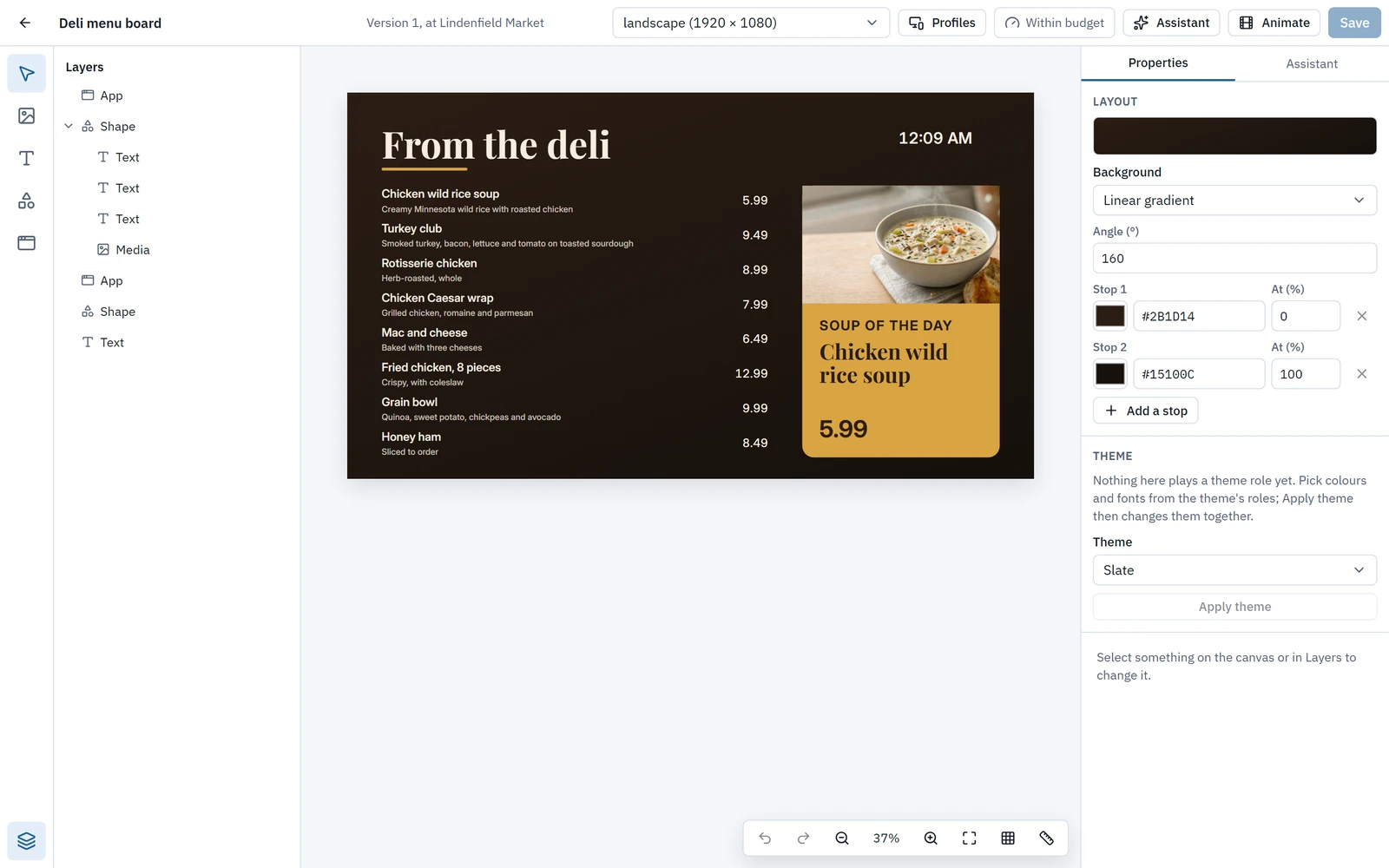
The designer’s canvas is drawn by the same engine the players use, so a layout looks the same in your browser as on the screen. An AI assistant drafts with you, and every layout adapts to each screen it runs on.
- Layers, snapping, alignment, text edited in place and full keyboard shortcuts, with undo and redo.
- A new-layout wizard that offers three layouts from a use, a theme and a prompt, or a starter layout without AI.
- An animation timeline with enter, emphasis and exit clips, easing and stagger.
- Themes from six colours, two fonts and a logo, or made from your website.
Every suggestion from the assistant waits for you to apply it, and each applied answer is one undo step.
Explore the layout designerAssistant and agents
AI that works inside your rules
The assistant sits on every page of the CMS and can do what the CMS does. Named agents run tasks on a schedule or on events. Skills you write teach both your own rules and routines, and all of it works inside the permissions, approvals and limits you set.
- The assistant acts with your own permissions, never more, and a change it proposes waits for you to confirm.
- Agents have an owner, a home place and roles, and can never be an owner, admin, approver or billing admin.
- One click on an alert asks the assistant for the likely cause and a suggested fix.
- Every agent action is in the audit log as “agent X on behalf of Y”.
Nobody, person or agent, approves their own change.
Explore the assistant and agentsWhere AI may act
You decide how far AI goes, place by place
For each place, choose how far AI may go and set a ceiling for everything below it. A preview shows what AI may do there before you save.
Observe
AI may look, never change.
Suggest
Every change AI makes on its own waits for a person’s approval. This is the default.
Co-pilot
Scoped changes run. Broad and irreversible ones wait for approval.
Autopilot
Scoped and broad changes run. Irreversible ones wait for approval.
Accessibility
Built for everyone who uses it
From the head office to the person on a ladder fitting the screen.
Built to WCAG 2.2 AA
Every part of the CMS is checked automatically against WCAG A and AA rules, in light and dark themes.
Keyboard and screen reader
The designer, data grid, place tree, maps and timeline all work from the keyboard, and charts carry their figures in a table.
Light and dark
System, light or dark, chosen by each person. Reduced motion is respected across the CMS, the timeline and the apps.
On a phone
Pairing, installer mode and the CMS pages work at phone width, for the people who fit the screens.
Product questions
What is included in Wyndlass?
The CMS with its layout designer, apps, data tables and content library; campaigns; screen management and sensors; Lookout proof of play and audience measurement; alerts and tasks; the assistant and agents; and a GraphQL API and MCP server. The media owner add-on adds advertising.
Which players does Wyndlass support?
Android 8.0 or later, from Google Play or our download page, and the Amazon Signage Stick. Players for BrightSign and Linux are in early access, and a player for Windows is coming.
Do screens keep playing if the network goes down?
Yes. Players play the last good content after a restart, keep apps showing their last data and keep proof of play until they reconnect. Content stays valid for 7 days offline; after that, a screen keeps playing and reports itself as stale.
Do we have to use AI?
No. Everything in the designer and the CMS works by hand, and the new-layout wizard gives you a starter layout without AI. For each place you choose how far AI may go, from Observe to Autopilot. Suggest is the default.
How do we get access?
Wyndlass is invite-only during launch. Request a demo and we will reply by email.
See Wyndlass on your screens
Access is by invitation during launch. Tell us about your network and we will reply by email.